
- This topic has 23 replies, 2 voices, and was last updated 6 years, 2 months ago by
Danny.
-
AuthorPosts
-
August 7, 2020 at 12:19 pm #11357
Hi,
I am Srihari Goli, In header MY logo is attaching bottom and top. I want relief that
August 7, 2020 at 4:33 pm #11358Danny
SupporterHi there,
Thanks for writing in!
In this case, please share us your site URL and the admin account of your site via private reply so we can investigate your case and help you out. Also, please point to specific page where we can see the problem. Any screenshots would be welcomed! (you could upload your images into https://imgbb.com/ and share the link here).
Best regards,
DannyAugust 11, 2020 at 7:38 am #11393This reply has been marked as private.August 11, 2020 at 11:22 am #11396SupporterHi there,
Thanks for your info!
The logo size will based on the menu height, so in this case, please increase the Menu Height (so the logo can get more space to display) in your Dashboard > Appearances > Customize > Header > Menu Height.
Hope this helps,
DannyAugust 11, 2020 at 1:56 pm #11400This reply has been marked as private.August 12, 2020 at 7:27 pm #11424SupporterHi there,
Thanks for your info!
In this case, please share us your site URL and the admin account of your site via private reply so we can investigate your case and help you out.
Best regards,
DannyAugust 13, 2020 at 2:00 pm #11441This reply has been marked as private.August 13, 2020 at 4:28 pm #11448SupporterHi there,
Thanks for you info!
But I can’t see your account information, it seems the browser cache issue.
In this case, please share us your site URL and the admin account of your site via the contact form at https://themeforest.net/user/themelogi so we can investigate your case and help you out. You could upload your screenshot link in that contact form too.
Looking forward to your response!
Best regards,
DannyAugust 14, 2020 at 12:50 am #11457This reply has been marked as private.August 14, 2020 at 12:51 am #11458This reply has been marked as private.August 14, 2020 at 12:51 am #11459This reply has been marked as private.August 14, 2020 at 5:38 am #11460SupporterHi there,
I’ve added some space in logo and add color orange hover to your menu in Appearances > Customize > Addition CSS. Please check again.
Best regards,
DannyAugust 18, 2020 at 10:28 am #11510HI,
Are check my problem
Regards
Srihari GoliAugust 19, 2020 at 2:55 am #11514SupporterHi there!
Thanks for your info!
Please let me know if you have any further questions.
Best regards,
DannyAugust 23, 2020 at 1:35 pm #11567Thank you for your support.
Plz. set the menu color in the dark blue (#1191d0). Preset showing blue light in color.
Regards
Srihari GoliAugust 24, 2020 at 5:34 am #11570SupporterHi there,
Thanks for your info!
I’ve changed the menu color for you, please check it again.
Best regards,
DannyAugust 25, 2020 at 1:25 pm #11575Thank you,
How to change copyright background-color (#f7941e) with black color font.
Plus I want to set Terms & Conditions and Privacy Policy (2 links) in copyright right side space.

Regards
Srihari GoliAugust 25, 2020 at 4:12 pm #11578SupporterHi there,
You can add the CSS code below to change the footer copyright background & color:
footer.bg-dark .sub-footer, footer.bg-graydark .sub-footer { background-color: #f7941e!important;}
footer .sub, footer .sub-footer a {color: #000!important;}
To add links in copyright, please add it in the layout-copyright.php file in themes/roneous/templates/footer folder, you can change the code below:
<div class="col-sm-6 text-right">
    <ul class="list-inline social-list">
        <?php echo roneous_footer_social_icons(); ?>
    </ul>
</div>
into this:
<div class="col-sm-6 text-right">
    <ul class="list-inline">
        <li><a href="#">Link 1</a></li>
        <li><a href="#">Link 2</a></li>
    </ul>
</div>
Hope this helps,
DannyAugust 26, 2020 at 8:49 am #11583Thank you for sending code
1) The copyright background color is changed thank you.
2) I changed the code in layout-copyright.php. But it not works. Only work when I select a copyright footer in the footer layout.
But I want a standard footer layout with the links (Terms & Conditions and Privacy Policy). Clear this.3) Please add a pop window for Subscribe Form (Which was in MailPoet in my DASHBoard) for the SUBSCRIBE NOW button on the Company page.
When someone clicks on SUBSCRIBE NOW it will appear as a pop window.Regards
Srihari GoliAugust 27, 2020 at 5:08 pm #11599SupporterHi there,
Thanks for your info!
2. Please do the change in the layout-standard.php file in themes/roneous/templates/footer folder instead.
3. In this case, please have a look at the demo page “Modal popup effect” http://demo.themelogi.com/roneous/elements/modal-popup-effect/ (in “Super scaled” button at bottom middle of the page). I think you can find that page in your site, and play around with the settings in there in order to add a contact form in popup.
Hope this helps,
DannyAugust 28, 2020 at 12:34 pm #11604Thank you,
1) I tried but it didn’t happen for set Terms & Conditions and Privacy Policy. Please set it your end.
2) I have set up a popup window but it only shows Contact Forms. I want your Subscribe form which was design in MailPoet as Subscribe Form.
Plz. check the image
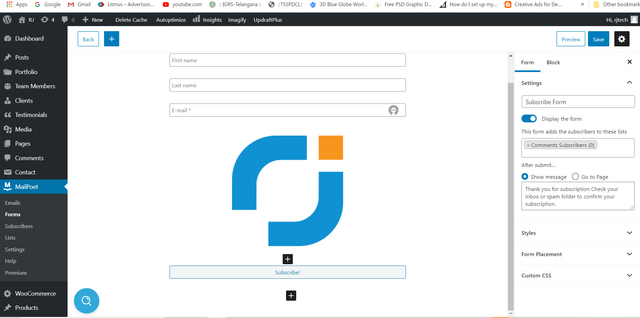
Regards
Srihari GoliAugust 28, 2020 at 5:00 pm #11612SupporterHi there,
Thanks for your info!
1. I’ve added your custom footer links as in the screenshot below:

Please change your link in templates/footer/layout-standard.php file.
2. Regretfully this isn’t a feature offered by the theme. It could be possible with custom development, but this would be outside the scope of support we can offer. If you want to make custom changes to the theme that requires theme modification, behaviour changes or 3rd party plugin integration (MailPoet, in this case), we suggest that you hire a developer at Envato Studio (https://studio.envato.com/).
Best regards,
DannySeptember 3, 2020 at 12:48 pm #11667Thank you,
Please set a pop window (Service-form in Contact Form) for the “GET QUOTE” button in menu.

Regards
Srihari GoliSeptember 3, 2020 at 5:43 pm #11673SupporterHi there,
Thanks for your info!
But the theme only support adding Contact Form into a popup button in page content only, as you can see in the demo here: http://demo.themelogi.com/roneous/elements/modal-popup-effect/
It doesn’t supported in the Menu button yet. We’ll consider to add this feature as an option in the next theme updates.
In this case, I recommend you to add a contact form section at bottom of your page, then link the “GET QUOTE” menu button into that contact section as in the topic here about one page menu: http://www.themelogi.com/tickets/topic/one-page-website/#post-5284
Thanks for your understanding. Take care!
Danny -
AuthorPosts

- You must be logged in to reply to this topic.