
 Danny
Hi there,
Thanks for writing in!
Actually, we’ve disabled this option since we don’t need it to build our live demo pages.
But if you want to enable it, please follow the steps here:
1. Open up the int.php file in themes/wanium/visualcompoer folder, and remove the code in line 250 below:
vc_remove_param('vc_row', 'content_placement');
2. Open up the vc_row.php file in themes/wanium/visualcompoer/vc_templates folder, and replace it with the content in the link here: https://paste.ofcode.org/cjbuRqnRUmndmPWarYXQ2M
3. Please add the code below to your Dashboard > Appearances > Customize > Addition CSS:
section.vc_row.vc_row-flex >.vc_column_container {margin-right: auto; margin-left: auto;}
@media (min-width: 768px) {section.vc_row.vc_row-flex >.vc_column_container {width: 750px;}}
@media (min-width: 992px) {section.vc_row.vc_row-flex >.vc_column_container {width: 970px;}}
@media (min-width: 1200px) {section.vc_row.vc_row-flex >.vc_column_container {width: 1170px;}}
Then you’ll see the new option “Content position” in Row Settings as in the screenshot here:
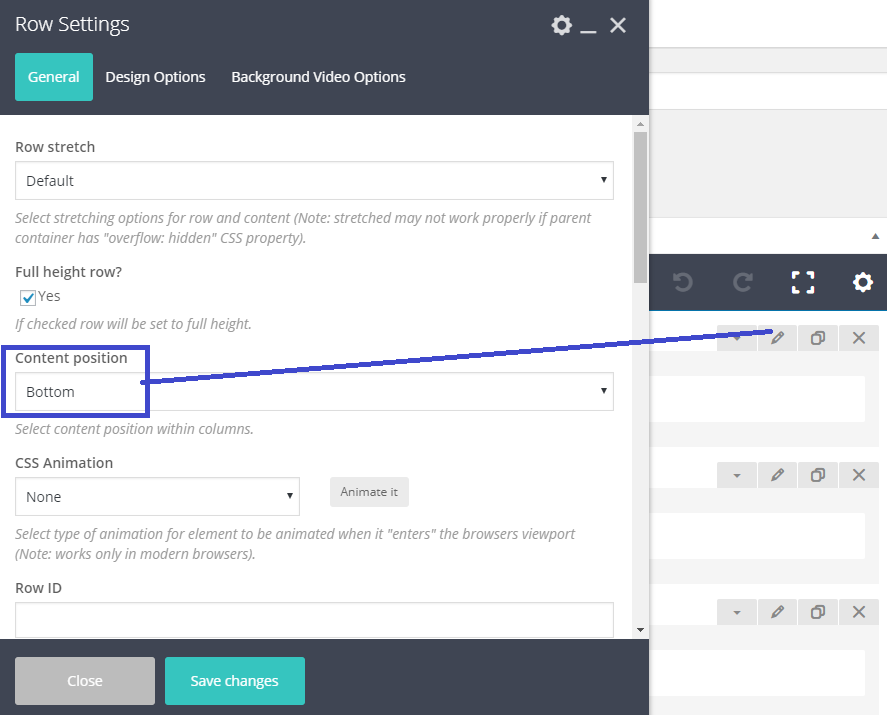
P.S: You may want to use child-theme so that your changes won’t be lost on theme updates.
Best regards,
Danny