
Tickets › Tickets › Roneous › Mega Menu Selection Disappearing After Save › Reply To: Mega Menu Selection Disappearing After Save
 Danny
Hi there,
Thanks for your info!
I’m sure 100% that we only use the default WordPress Importer to import the exported .xml content file that you can find in themes/roneous/inc/importer/content.xml file.
If you’re not sure about it, you can always ask some developers you know so they can check the import process. Our theme is trusted by thousand of customers, so you can trust us, our themes are validated by Envato also.
Also, you can try to search “405 Not Allowed wordpress import” on Google, there are many articles talk about PHP config, but not just the code security.
But the importer in your site work fine except the “megamenu” option in the Menus which I think it could be something wrong in the imported menu only, so no need to worry about PHP config anymore.
Actually, there is a way to resolve the “megamenu” option, you can just add a CSS class named megamenu-item to enable megamenu feature instead of select Megamenu option as in the screenshot here:
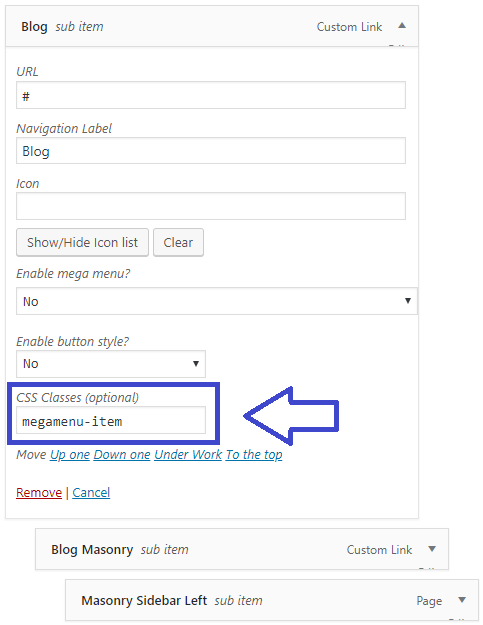

Again, I don’t know why the menu meta data (Megamenu, Menu button) don’t work in some cases like in your site, but I’ll try to investigate this issue, and keep updating the theme. Meanwhile, please use the CSS class option as in the screenshot above to enable Megamenu feature (I am sorry for your inconvenience, I’ll try to resolve it in next theme updates).
P.S 1: There are 2 reasons some other themes included the copyright full resolution photos (almost cases is the reason number 2) :
1 – They bought the full license of the commercial images, so they are right to add it into their theme package.
2 – There are only free images that you can find in some free stock photos sites such as: https://unsplash.com/ or https://www.pexels.com/, so it’s ok to use those images.
But many authors are same with us, such as the popular Salient WordPress theme on Themeforest as you can see in the screenshot below:
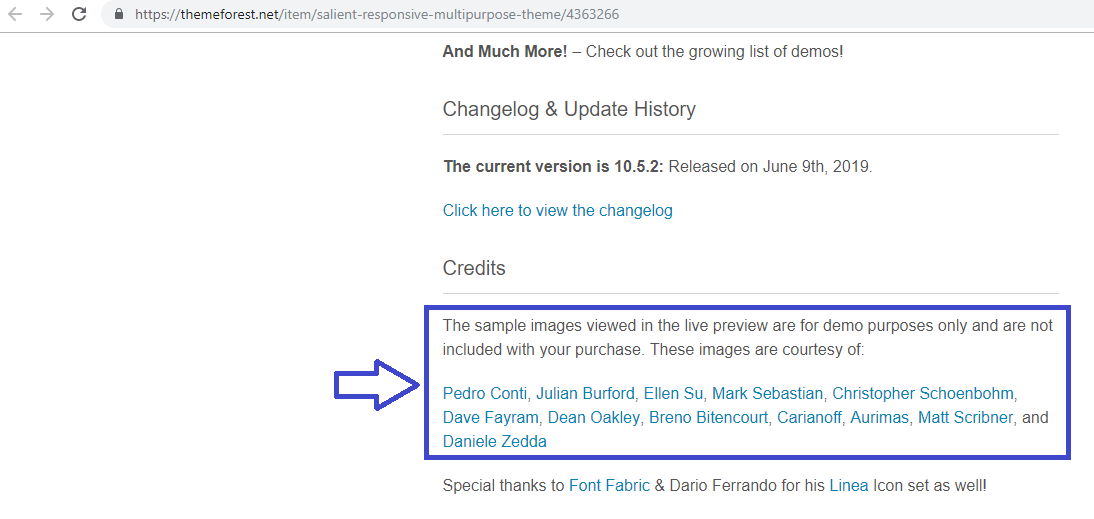
Also, using placehoder images will help customers to improve the importing process time.
But we’ll consider to add an option in next updates so user can choose free stock photos or placeholder images (those who want to use their own actual images).
P.S 2: I’ve already added the megamenu-item class name into your menu, so you can check your site again.
Best regards & thanks for your understanding,
Danny